
Introduction to Data Visualization

Introduction to
Data Visualization


Kris Sankaran
Data Narratives
14 | January | 2026

Plan

Part 1: Graphical Encoding

Part 2: Multipanel Plots

Part 1: Graphical Encoding

Discussion

Find an example of a visualization you created in a previous class. With your neighbors, discuss:

  • Why did you make it?
  • Who was your audience?
  • If you had a chance to revise it, what would you change?

More generally,

  • When are visualizations worth making?
  • What makes a visualization good?

Exercise

Work through [City Temperatures] in the exercise sheet.

https://go.wisc.edu/ylp52p

How many times larger is the circle on the right?


How many times taller is the bar on the right?


Encoding and Efficiency

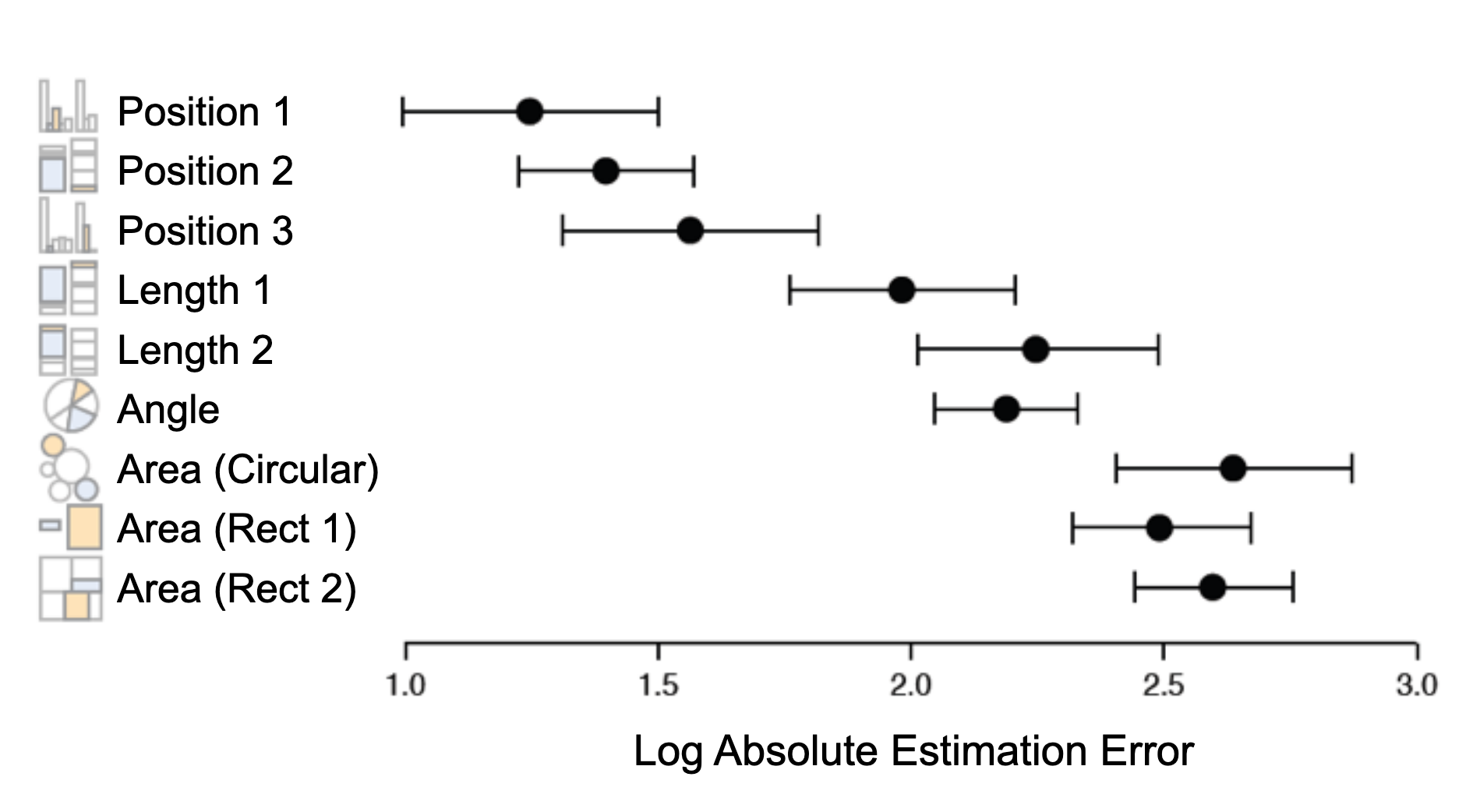
Different ways of encoding information are perceived with different accuracies. This means that any visualization implicitly prioritizes some comparisons over others.


Figure from [1].

Popout

No graphical encoding is neutral.

  • Which comparisons are automatic?
  • Which are laborious?

Exercise

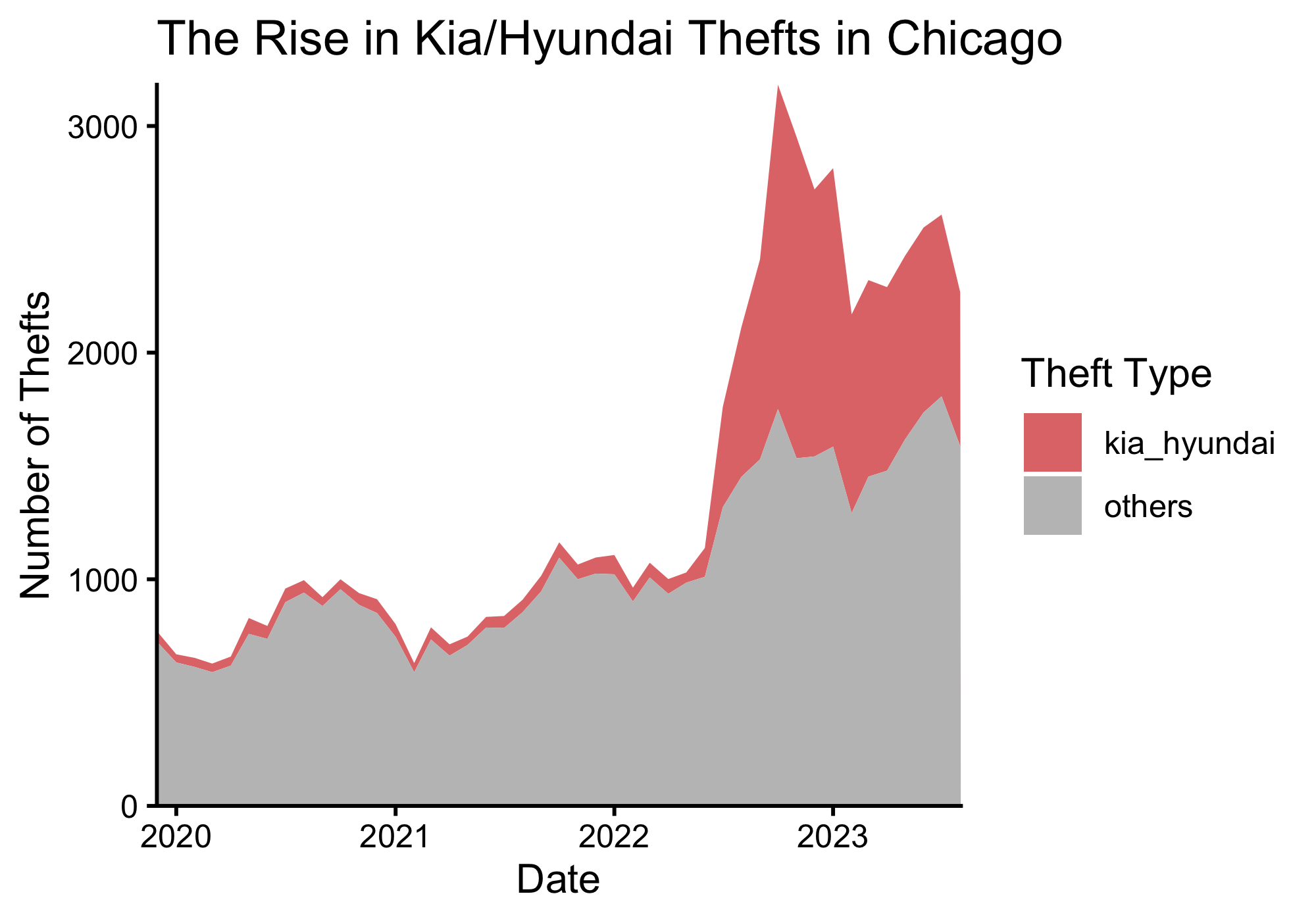
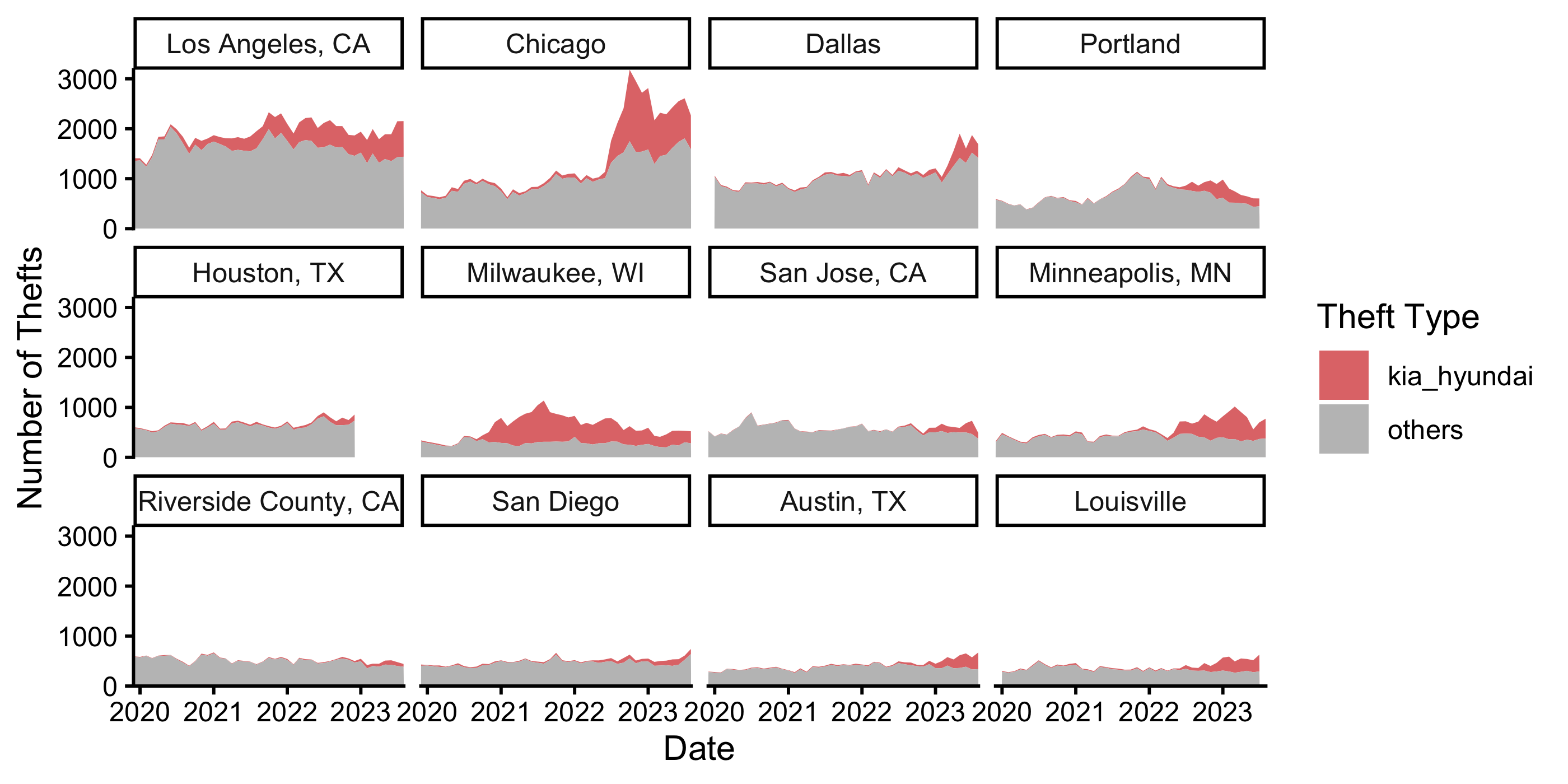
Work through [Kia Thefts] in the exercise sheet.

https://go.wisc.edu/ylp52p

For more exercises: https://go.wisc.edu/k1ng8o

Data-to-Ink Ratio

Premature summarization is the root of all evil in statistics.

– Susan Holmes

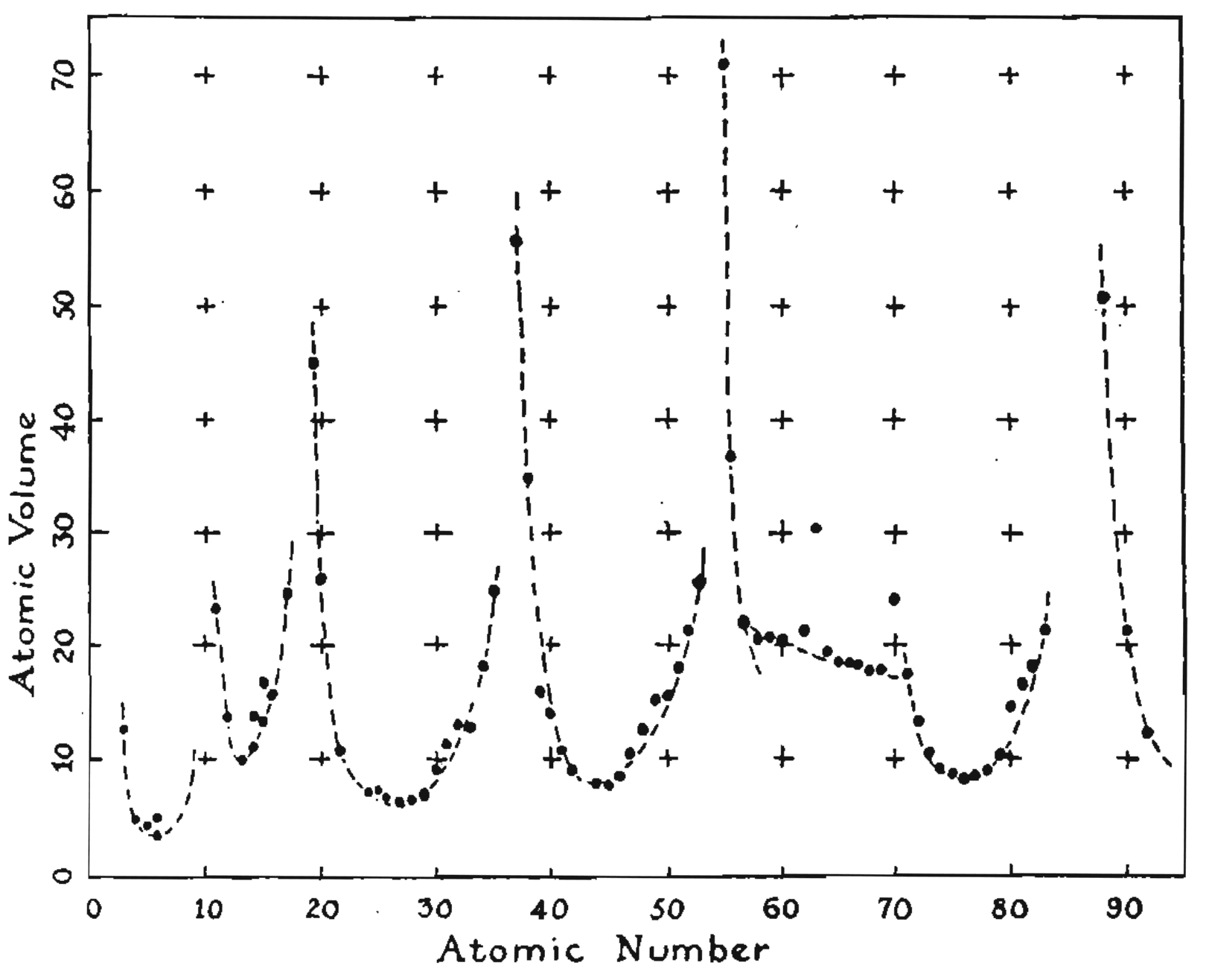
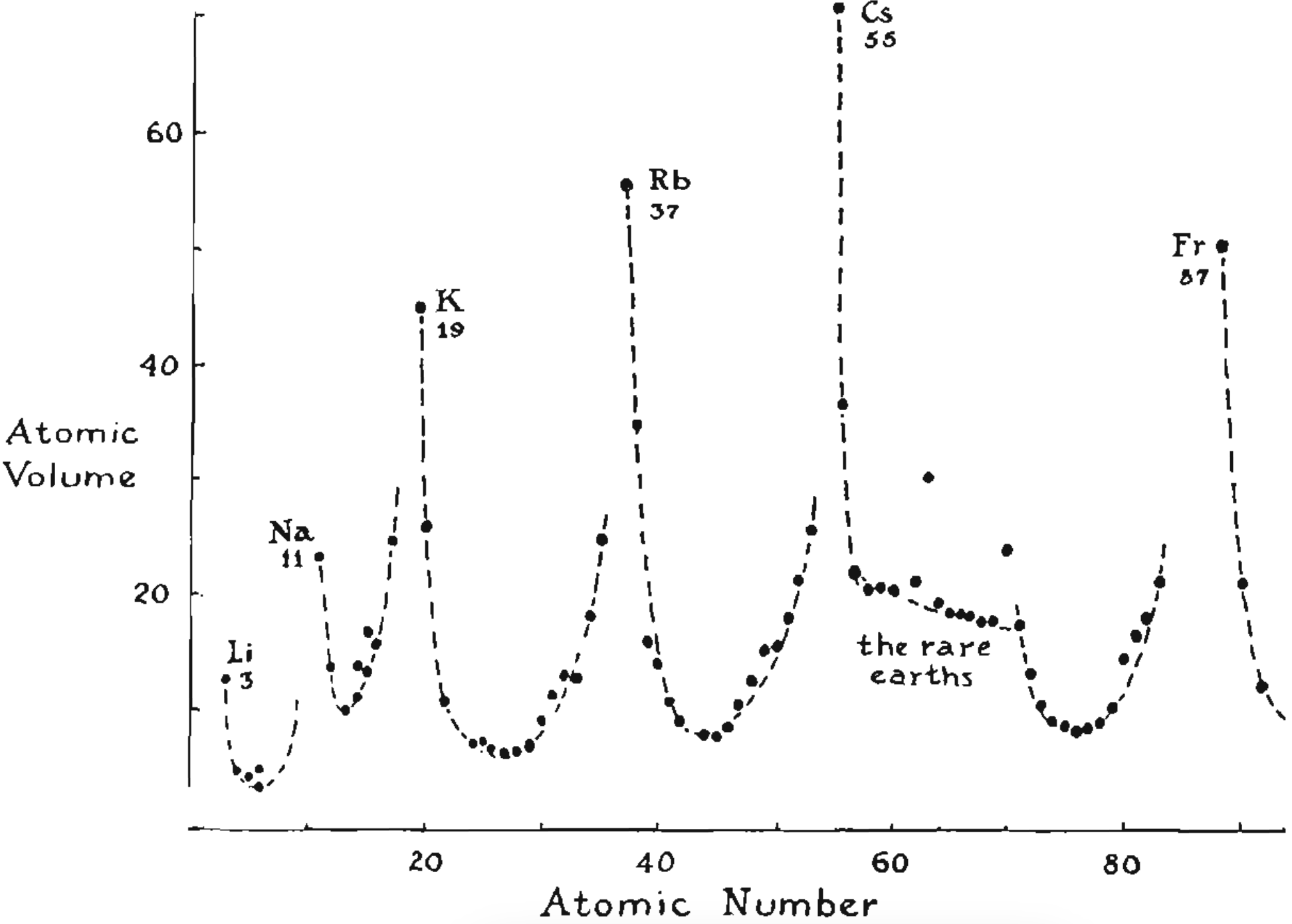
Good visualizations show more of the data, faithfully represent it, and are memorable.


Figure from [2].

Data-to-Ink Ratio

Premature summarization is the root of all evil in statistics.

– Susan Holmes

Good visualizations show more of the data, faithfully represent it, and are memorable.


Figure from [2].

Data-to-Ink Ratio

Premature summarization is the root of all evil in statistics.

– Susan Holmes

Good visualizations show more of the data, faithfully represent it, and are memorable.


#2 from [3].

Attention-to-Detail

Creating a visualization is like writing an essay. It should go through many revisions.

  • Make sure the figure has correctly annotated axes and legends. The font size should be comparable to other text in the report / application.
  • Don’t use more than 8 - 10 qualitative colors at a time. Consider customizing the palette.
  • Experiment with several encodings to see what they prioritize.
  • Save the figure with high resolution.

Discussion

Revisit the visualizations you discussed with your neighbors at the start of the class.

  • What are its graphical encodings? How does this choice make some questions easier or harder to answer?

  • Discuss potential improvements and their rationale. How would you implement them?

References

[1] J. Heer et al. “Crowdsourcing graphical perception: using mechanical turk to assess visualization design”. In: Proceedings of the SIGCHI conference on human factors in computing systems. 2010, pp. 203-212.

[2] E. R. Tufte et al. The visual display of quantitative information. Vol. 2. 9. Graphics press Cheshire, CT, 1983.

[3] Top ten worst graphs - biostat.wisc.edu. https://www.biostat.wisc.edu/~kbroman/topten_worstgraphs/. [Accessed 12-01-2026].
Solutions

Temperature

library(tidyverse)
theme_set(theme_classic())

temperature <- read_csv("https://go.wisc.edu/bo9m94")

Temperature

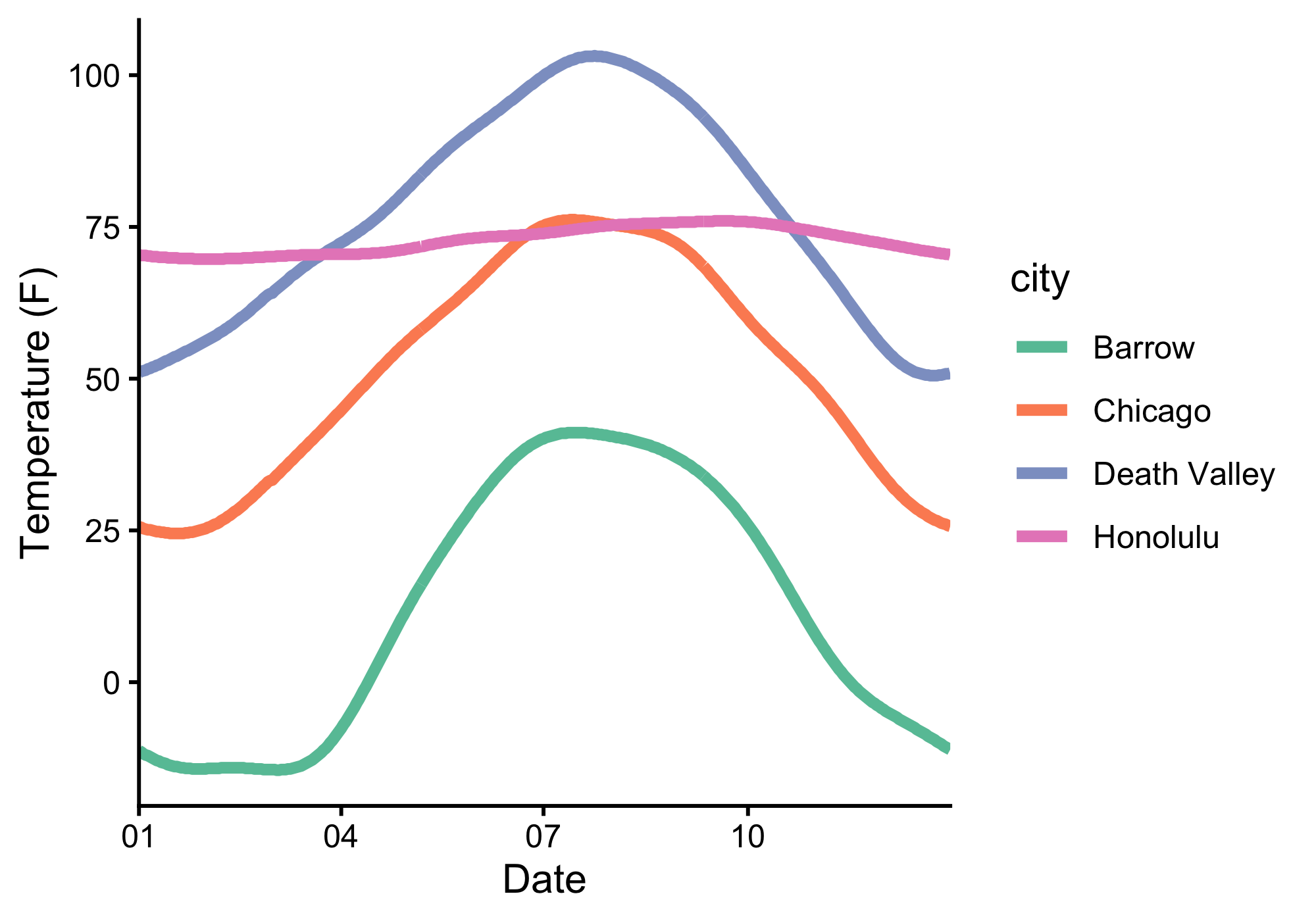
ggplot(temperature) +
    geom_line(
        aes(date, temperature, col = city),
        linewidth = 1.5
    ) +
    scale_color_brewer(palette = "Set2") +
    scale_x_date(date_labels = "%m", expand = c(0, 0))

Temperature

Temperature

monthly_temp <- temperature |>
    group_by(city, month) |>
    summarise(mean_temp = mean(temperature))
monthly_temp
# A tibble: 48 × 3
# Groups:   city [4]
   city   month mean_temp
   <chr>  <chr>     <dbl>
 1 Barrow 01       -13.4 
 2 Barrow 02       -14.2 
 3 Barrow 03       -12.6 
 4 Barrow 04         1.78
 5 Barrow 05        21.1 
 6 Barrow 06        35.6 
 7 Barrow 07        40.8 
 8 Barrow 08        39   
 9 Barrow 09        32.1 
10 Barrow 10        17.2 
# ℹ 38 more rows
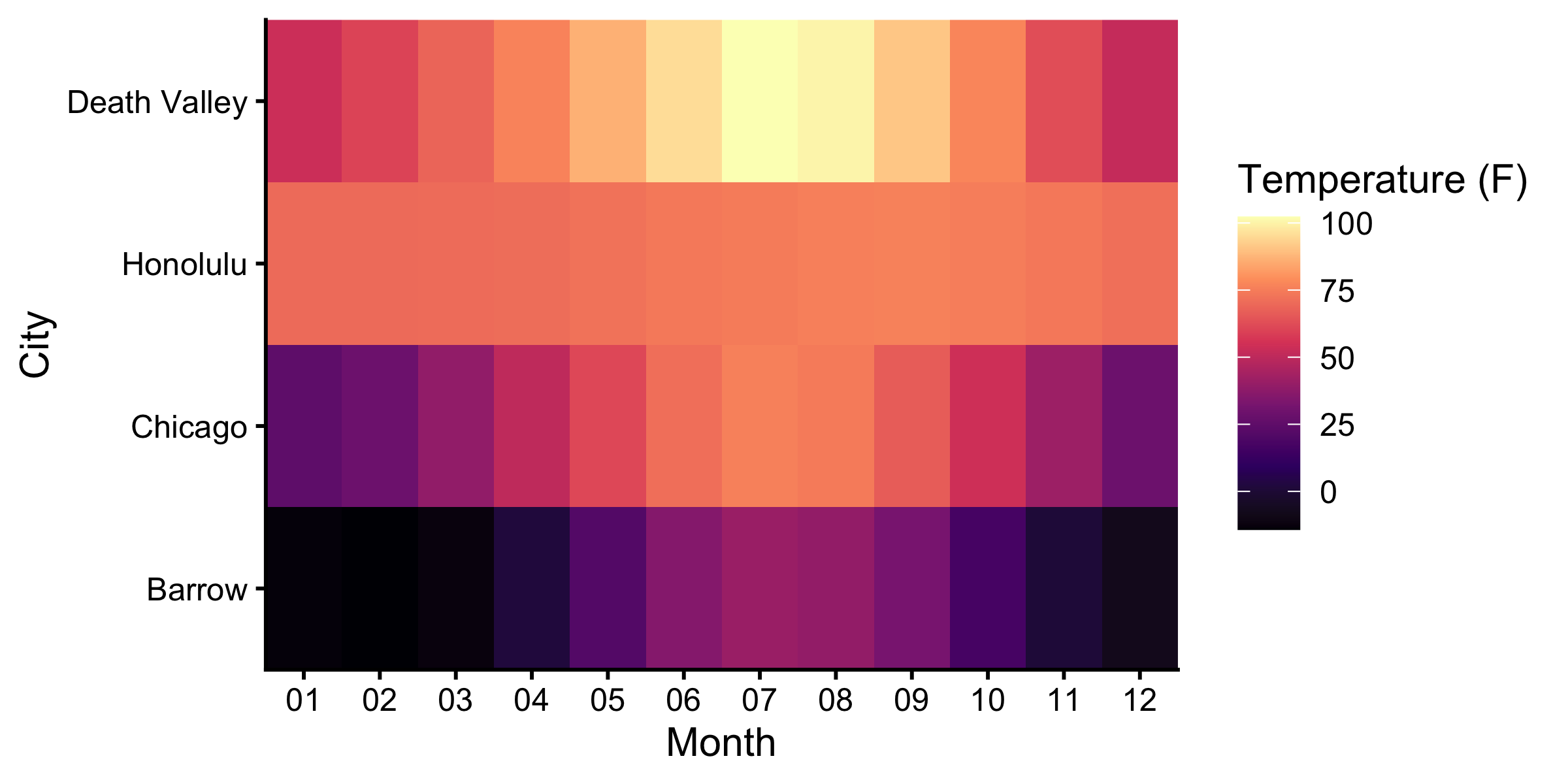
ggplot(monthly_temp) +
    geom_tile(aes(month, reorder(city, mean_temp), fill = mean_temp)) +
    scale_fill_viridis_c(option = "magma") +
    scale_x_discrete(expand = c(0, 0)) +
    scale_y_discrete(expand = c(0, 0)) +
    labs(
        x = "Month",
        y = "City",
        fill = "Temperature (F)"
    )

Temperature

Thefts

kia <- read_csv("https://go.wisc.edu/a0y51y")
head(kia, 4)
# A tibble: 4 × 5
  Date       City                 total kia_hyundai others
  <date>     <chr>                <dbl>       <dbl>  <dbl>
1 2019-12-01 Portland               592          13    579
2 2019-12-01 Chicago                767          46    721
3 2019-12-01 San Diego              430          25    405
4 2019-12-01 Riverside County, CA   594          11    583

Thefts

kia <- kia |>
    pivot_longer(kia_hyundai:others, names_to = "type")

kia |>
    filter(City == "Chicago") |>
    ggplot() +
    geom_area(aes(Date, value, fill = type)) +
    scale_fill_manual(values = c("#e17878", "#c0c0c0")) +
    scale_x_date(expand = c(0, 0)) +
    scale_y_continuous(expand = c(0, 0)) +
    labs(fill = "Theft Type", y = "Number of Thefts", title = "The Rise in Kia/Hyundai Thefts in Chicago")

Thefts

Thefts

ggplot(kia) +
    geom_area(aes(Date, value, fill = type)) +
    facet_wrap(~ reorder(City, -total)) +
    scale_fill_manual(values = c("#e17878", "#c0c0c0")) +
    scale_x_date(expand = c(0, 0)) +
    scale_y_continuous(expand = c(0, 0)) +
    labs(fill = "Theft Type", y = "Number of Thefts")

Thefts